
We're pleased to announce that iDailyDiary version 3.60 (see note below on 3.61) has been released. This update contains improvements to the word processing capabilities (e.g. text wrap around images) and a number of minor enhancements and bug fixes. This is a relatively small update, we are working on a more feature-rich update to be released in 2010.
Here's a list of changes in this update, note some of these features are only available in the Professional version:
New: Macedonian translation for iDailyDiary
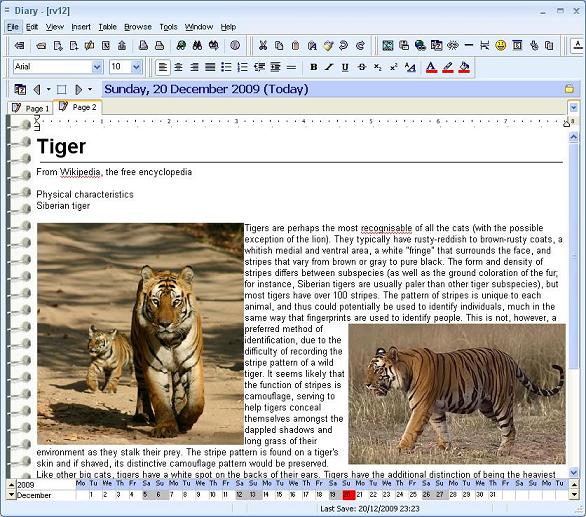
Impr: Editor, text wrap around left and right aligned images
Impr: Editor, can use Office 2007 converters to export to Word 2007 format
Impr: Editor, bullets will appear same color as text (rather than always black)
Impr: Better integration with Windows 7 and Vista
Impr: Can specify record locking mode in Preferences (for iDD on network share)
Impr: Timer now includes Cumulative time
Impr: Shortcut keys changed (CTRL+S = Save)
Impr: Default tab names can have macro [d] for current date, [t] for current time
Impr: When renaming tabs can press F5 to name with datestamp or F6 for timestamp
Impr: Can copy contents of Search results
Fixed: Bug with iDailyDiary not appearing completely maximized when re-opened
Fixed: Bug when setting hyperlink to multiple items <<selection>>
Fixed: Date Errors when using diary in 'notebook' style (View - Diary Style)
Fixed: Intermittent errors on importing another iDailyDiary database
To download the updated program (Free or 30 Day Professional Evaluation) use our normal download link:
http://www.splinterware.com/download/index.htm
If you are a registered user you can login and download iDailyDiary Professional from the link below using your registered user ID and password.
http://www.splinterware.com/registered/login.php
This update should simply be installed over the top of your existing installation. All diaries will continue to work exactly as before.
Announcement: iDailyDiary Professional - Update to 3.61
Moderator: Support
Announcement: iDailyDiary Professional - Update to 3.61
Last edited by support on December 27th, 2009, 2:20 pm, edited 2 times in total.
Splinterware Support
If you have installed our previous iDailyDiary update version 3.60, released seven days ago, please note we have confirmed a serious bug in the spelling checker that can cause corruption when using the Change misspelled word. We recommend you immediately update to the latest fixed version 3.61. Apologies for the inconvenience caused.
Please use the same links above. All links now download version 3.61.
These are the changes in 3.61:
Fixed: Serious bug in spelling checker (introduced in 3.60), corruption after using Change spelling
Fixed: Insert Smileys (and small images) will now default to baseline aligned text (not left wrap)
Impr: Spacing around inserted pictures can be adjusted in Properties
Please use the same links above. All links now download version 3.61.
These are the changes in 3.61:
Fixed: Serious bug in spelling checker (introduced in 3.60), corruption after using Change spelling
Fixed: Insert Smileys (and small images) will now default to baseline aligned text (not left wrap)
Impr: Spacing around inserted pictures can be adjusted in Properties
Splinterware Support